Featured prompt
Claude Code Status Line Setup
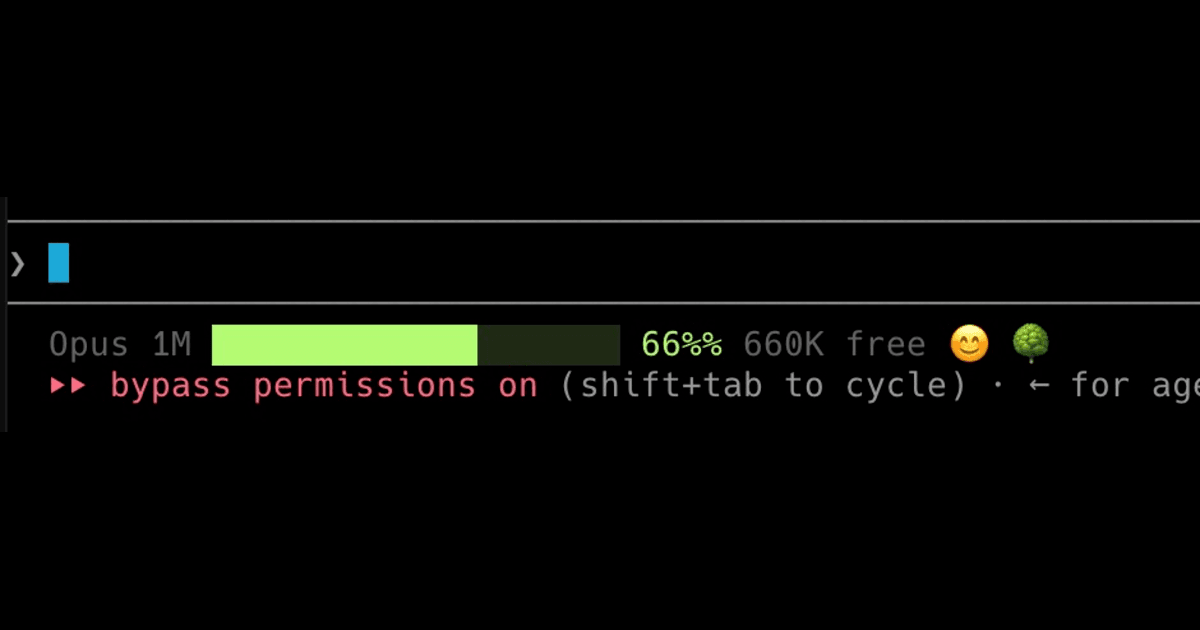
A machine-setup prompt that fully replaces any existing Claude Code status line with a jq-powered script: model + window size from the payload, colored remaining bar, mood emoji, and dimmed worktree folder name when inside a linked git worktree.
Copies the full prompt text, including setup steps and variables.
Tags
claude-codeStatusLineautomationdeveloper-tools
Preview
Prompt
Set up my Claude Code status line to be an exact copy of a specific design.

Use the `/statusline` command to do this — it pulls Claude Code's built-in **statusline-setup** skill that configures the status line setting. But transcribe the script below **verbatim**; do NOT improvise, redesign, or invent your own version.

**IMPORTANT — this must fully replace whatever is already there.** Three cases, all handled the same way:

1. **Nothing configured yet** → install fresh.
2. **A different custom status line configured** in `~/.claude/settings.json` (or anywhere else) → remove/overwrite it.
3. **An older version of _this_ status line already installed** — recognizable by the 20-char `█░` bar and mood emoji, but with either no worktree section at all, or a bare ` 🌳` with no worktree name after it → **overwrite the entire script file; do NOT patch or hand-edit the old copy.** Older revisions drift in small ways, so the only acceptable end state is that `~/.claude/statusline-command.sh` matches the script below exactly.

When you're done there must be exactly one `statusLine` config in `~/.claude/settings.json`, exactly one status line script, and it must be this one.

Steps:

1. Make sure `jq` is installed (it's required — without it the bar silently won't render). Check with `command -v jq`. If missing, install it (macOS: `brew install jq`; Debian/Ubuntu: `sudo apt-get install -y jq`).

2. Write this EXACT content to `~/.claude/statusline-command.sh` (create the `~/.claude` dir if needed), then `chmod +x` it. If the file already exists, **truncate and rewrite it wholesale** — do not merge, append, or surgically edit the worktree block of an older copy:

```bash
#!/usr/bin/env bash
input=$(cat)

# ── Model detection ──────────────────────────────────────────
# Claude Code sends the model as an OBJECT (.model.id). Hand-made or older
# payloads may send a plain string, so handle both without erroring out.
model_id="${CLAUDE_MODEL_ID:-}"
if [ -z "$model_id" ]; then
  model_id=$(echo "$input" | jq -r 'if (.model|type)=="object" then (.model.id // empty) else (.model // empty) end')
fi
model_lower=$(echo "$model_id" | tr '[:upper:]' '[:lower:]')

# Context size is read from the payload, never hardcoded per model — the same
# model ships in different window sizes (e.g. Sonnet 200K vs Sonnet 1M), so
# guessing from the name gets both the label and the "free" count wrong.
total_tokens=$(echo "$input" | jq -r '.context_window.context_window_size // empty')
case "$total_tokens" in ''|null|*[!0-9]*) total_tokens=200000 ;; esac

if [ "$total_tokens" -ge 1000000 ]; then
  ctx_label="$(( total_tokens / 1000000 ))M"
elif [ "$total_tokens" -ge 1000 ]; then
  ctx_label="$(( total_tokens / 1000 ))K"
else
  ctx_label="${total_tokens}"
fi

if echo "$model_lower" | grep -q "opus"; then
  model_label="Opus ${ctx_label}"
elif echo "$model_lower" | grep -q "sonnet"; then
  model_label="Sonnet ${ctx_label}"
elif echo "$model_lower" | grep -q "haiku"; then
  model_label="Haiku ${ctx_label}"
elif echo "$model_lower" | grep -q "fable"; then
  model_label="Fable ${ctx_label}"
else
  model_label="Claude ${ctx_label}"
fi

# ── Context window ───────────────────────────────────────────
remaining=$(echo "$input" | jq -r '.context_window.remaining_percentage // empty')

bar=""
face=""
if [ -n "$remaining" ]; then
  pct=$(printf "%.0f" "$remaining")

  # Free tokens (human-readable)
  free_tokens=$(( total_tokens * pct / 100 ))
  if [ "$free_tokens" -ge 1000000 ]; then
    free_label="$(( free_tokens / 1000 ))K"
  elif [ "$free_tokens" -ge 1000 ]; then
    free_label="$(( free_tokens / 1000 ))K"
  else
    free_label="${free_tokens}"
  fi

  # Color zone based on remaining %
  #   Green  > 20%  — safe
  #   Amber  10-20% — approaching compaction
  #   Red    < 10%  — compaction imminent
  if [ "$pct" -gt 20 ]; then
    color="\033[32m"   # green
  elif [ "$pct" -ge 10 ]; then
    color="\033[33m"   # yellow / amber
  else
    color="\033[31m"   # red
  fi
  reset="\033[0m"
  dim="\033[90m"

  # 20-char wide bar
  width=20
  filled=$(( pct * width / 100 ))
  [ "$filled" -gt "$width" ] && filled=$width
  empty_count=$(( width - filled ))

  filled_str=""
  empty_str=""
  for ((i=0; i<filled; i++)); do filled_str+="█"; done
  for ((i=0; i<empty_count; i++)); do empty_str+="░"; done

  bar="${color}${filled_str}${reset}${dim}${empty_str}${reset} ${pct}% ${free_label} free"

  # ── Smiley face (mood based on remaining context) ──────────
  if [ "$pct" -ge 75 ]; then
    face="😄"
  elif [ "$pct" -ge 55 ]; then
    face="😊"
  elif [ "$pct" -ge 40 ]; then
    face="😐"
  elif [ "$pct" -ge 30 ]; then
    face="😟"
  elif [ "$pct" -ge 20 ]; then
    face="😰"
  elif [ "$pct" -ge 10 ]; then
    face="😱"
  elif [ "$pct" -ge 3 ]; then
    face="🤮"
  else
    face="💀"
  fi
fi

# ── Worktree indicator ───────────────────────────────────────
# Show 🌳 followed by the worktree's folder name on the far right when the
# current directory is a linked git worktree. A linked worktree has a
# per-worktree git dir that differs from the repo's common git dir.
# (reset/dim are re-declared here so the dimmed name still renders even when
# the context-window block above didn't run.)
reset="\033[0m"
dim="\033[90m"

dir=$(echo "$input" | jq -r '.workspace.current_dir // .cwd // empty')
worktree_out=""
if [ -n "$dir" ]; then
  git_dir=$(git -C "$dir" rev-parse --git-dir 2>/dev/null)
  git_common_dir=$(git -C "$dir" rev-parse --git-common-dir 2>/dev/null)
  if [ -n "$git_dir" ] && [ -n "$git_common_dir" ] && [ "$git_dir" != "$git_common_dir" ]; then
    worktree_out=" 🌳"
    # Name the worktree by its root folder (the worktree's directory name)
    worktree_name=$(basename "$(git -C "$dir" rev-parse --show-toplevel 2>/dev/null)")
    [ -n "$worktree_name" ] && worktree_out="${worktree_out} ${dim}${worktree_name}${reset}"
  fi
fi

# ── Assemble output ──────────────────────────────────────────
output="${model_label}"
[ -n "$bar" ]          && output="${output} ${bar}"
[ -n "$face" ]         && output="${output} ${face}"
[ -n "$worktree_out" ] && output="${output}${worktree_out}"

printf "%b" "$output"
```

3. Wire it into `~/.claude/settings.json`. PRESERVE all my other existing settings — only add or replace the top-level `statusLine` key (replacing any status line I already had). Use my real absolute home path (run `echo $HOME` to get it; do not hardcode someone else's username):

```json
"statusLine": {
  "type": "command",
  "command": "bash <MY_HOME>/.claude/statusline-command.sh"
}
```

If `settings.json` doesn't exist, create it as valid JSON containing just that key. If it exists, merge carefully so the rest of the file is untouched and any previous `statusLine` is overwritten.

4. Confirm it works. Run every check below and show me the output of each.

**Base line** — pipe a sample payload through the script, using the real shape Claude Code sends (`.model` is an object, and the window size comes from `.context_window.context_window_size`):

```bash
echo '{"model":{"id":"claude-opus-5[1m]"},"context_window":{"remaining_percentage":82,"context_window_size":1000000}}' | bash ~/.claude/statusline-command.sh
```

It should print:  `Opus 1M ████████████████░░░░ 82% 820K free 😄`

**Sizing check** — the context size must come from the payload, not the model name. Same model, smaller window, and a different model at 1M:

```bash
echo '{"model":{"id":"claude-opus-5"},"context_window":{"remaining_percentage":82,"context_window_size":200000}}' | bash ~/.claude/statusline-command.sh
echo '{"model":{"id":"claude-sonnet-5"},"context_window":{"remaining_percentage":82,"context_window_size":1000000}}' | bash ~/.claude/statusline-command.sh
```

These must print `Opus 200K … 164K free` and `Sonnet 1M … 820K free` respectively. If either shows the wrong size, the script is guessing from the model name instead of reading the payload — go back and fix it.

**Worktree branch** — the 🌳 and the name only appear when the current directory is an actual linked git worktree, so the payload above won't show them. To verify that branch, run it from inside a worktree (or feed a worktree path in), e.g.:

```bash
echo '{"model":{"id":"claude-opus-5[1m]"},"context_window":{"remaining_percentage":82,"context_window_size":1000000},"workspace":{"current_dir":"'"$(pwd)"'"}}' | bash ~/.claude/statusline-command.sh
```

When `current_dir` is a linked worktree it should append ` 🌳 <worktree-folder-name>` to the end of the line, with the name dimmed — e.g. `Opus 1M ████████████████░░░░ 82% 820K free 😄 🌳 feature-auth`.

If I don't have a worktree handy, make a throwaway one to prove the branch fires, then clean it up:

```bash
git worktree add /tmp/wt-check -b wt-check 2>/dev/null
echo '{"model":{"id":"claude-opus-5[1m]"},"context_window":{"remaining_percentage":82,"context_window_size":1000000},"workspace":{"current_dir":"/tmp/wt-check"}}' | bash ~/.claude/statusline-command.sh
git worktree remove /tmp/wt-check --force && git branch -D wt-check
```

**Negative check** — confirm it stays quiet where it should. Against a normal (non-worktree) directory it must print NO 🌳 and no folder name:

```bash
echo '{"model":{"id":"claude-opus-5[1m]"},"context_window":{"remaining_percentage":82,"context_window_size":1000000},"workspace":{"current_dir":"'"$HOME"'"}}' | bash ~/.claude/statusline-command.sh
```

The expected status line format is:

```
<model label> <colored 20-char bar> <pct>% <free tokens> free <mood emoji> [🌳 <worktree name>]
```

The worktree segment is conditional — it appears **only** inside a linked git worktree. In a repo's main working tree, or in a non-git directory, nothing is appended. There is deliberately no always-on "current project" indicator.
Variables
MY_HOMEAbsolute home path used in the settings.json command.remaining_percentageSample context-window percentage used for verification.